How it works

Live in about five minutes.

Sign up, answer a few questions about your business, connect a phone number and make a test call. After that, Juni answers and you see every call in the app.

Plans from $59/month.

Free 7-day trial with 15 minutes of calls. No card needed.

Setup, step by step

The app walks you through six short screens. Save and come back any time.

  1. Tell Juni about your business

    Pick your type of business, then give Juni the basics it needs to answer callers.

    • Business name, address, hours and website
    • Your services, with prices and how long each takes
    • A voice and a greeting style, or your own greeting
    • Fix or add anything later with Teach Juni

    About 2 minutes.

    The setup screen where you pick Juni's voice and greeting style, with voice samples to play
    Real screen from the JuniVoice app, sample data.
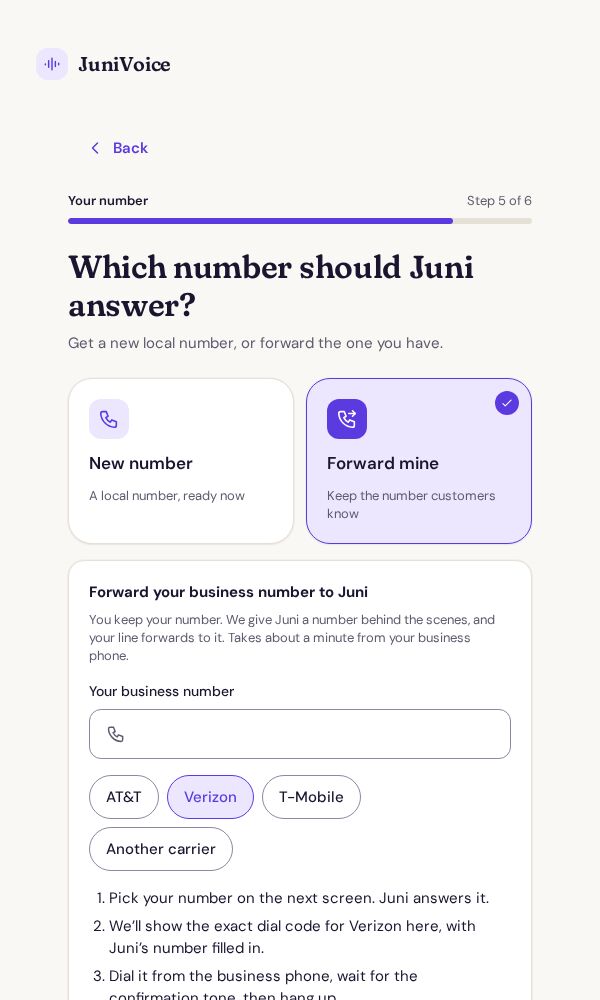
  2. Forward your number, or get a new one

    Keep the number your customers know and forward it to Juni, or pick a new local number.

    • Forwarding: pick your carrier (AT&T, Verizon, T-Mobile or another) and we show the exact code to dial
    • New number: search by area code, digits or a word
    • Numbers are free during your trial
    • Change it any time under Number and phone

    About a minute.

    The setup screen for choosing a new number or forwarding your own, with carrier options
    Real screen from the JuniVoice app, sample data.
  3. Make a test call and go live

    Call your number and watch the call appear with a live transcript. Then you're live.

    • Try asking for a service you don't offer
    • Ask about your hours or prices
    • Leave a message and spell your email
    • The summary appears a few seconds after you hang up

    About 2 minutes.

    The JuniVoice Home screen with calls that need you and recent calls, sample data
    Real screen from the JuniVoice app, sample data.

What you see after every call

The JuniVoice app shows what Juni did and the few things that need you. Summaries also arrive by email.

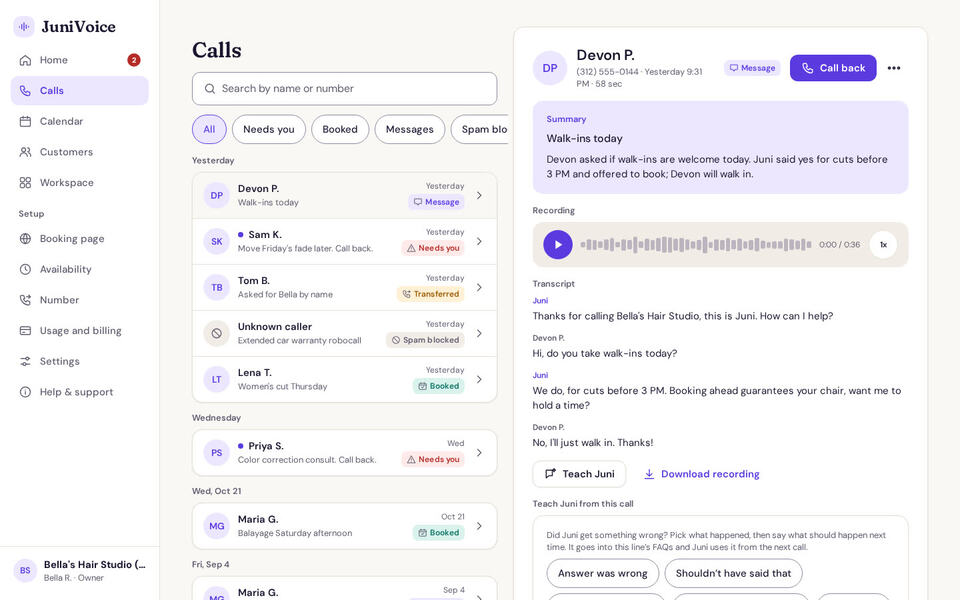
  • A call in the JuniVoice app with its summary, recording and transcript, sample data

    The call, summarized

    Who called, what they wanted, what Juni did and the next step, with the recording and transcript.

  • The Messages screen with two calls that need a call back, sample data

    What needs you

    Messages with a "Do this" line, Call back and Mark done buttons.

  • The workspace calendar with a week of appointments, sample data

    Bookings on your calendar

    Appointments Juni booked, next to those from your booking page and your own.

  • A customer record in the workspace with calls and appointments, sample data

    Customer records

    Every caller becomes a customer with their calls and appointments on the record.

Real screens from the JuniVoice app and a demo workspace, with sample data: Bella's Hair Studio is a demo business and the callers are made up.

What it costs

Every plan includes everything on this page. Plans differ only by how many minutes of calls are included each month.

Free 7-day trial with 15 minutes of calls. No card needed.
Questions owners ask

Do I need any equipment or software?

No. Juni works with the phone line you have. You use the JuniVoice app in your browser at app.getjunivoice.com; your business workspace and booking page are included.

Can I keep my business number?

Yes. Forward it to Juni with a short code from your business phone; we show the exact code for AT&T, Verizon and T-Mobile, and the steps for other carriers. Forwarding only the calls you don't answer is coming soon.

Can I test Juni before customers hear it?

Yes. The last setup step is a test call from any phone, with a live transcript. You can also hear Juni right now on the home page.

What if I get stuck during setup?

Call (970) 598-2842 or email [email protected]. Help with setup is included on every plan and in the trial.

Can I change things after I'm live?

Anything. Teach Juni new facts in a sentence, change the voice or greeting under Settings, and update services and hours under Booking page. Changes apply from the next call.

What happens when the trial ends?

The trial lasts 7 days or 15 minutes of answered calls, whichever comes first. We give you a heads-up at 10 minutes and on day 6. When it ends, Juni stops answering: callers hear "Sorry, we can't take your call right now" until you choose a plan. There is no card on file and nothing is charged automatically; you pay only when you pick a plan. If you decide not to continue, your number is held for 14 days and your workspace export is emailed to you.

Let Juni take the next call.

Setup takes about five minutes. Try it free on your own line: 7 days and 15 minutes of calls, no card needed.

Plans from $59/month. Free 7-day trial with 15 minutes of calls. No card needed.