Getting started
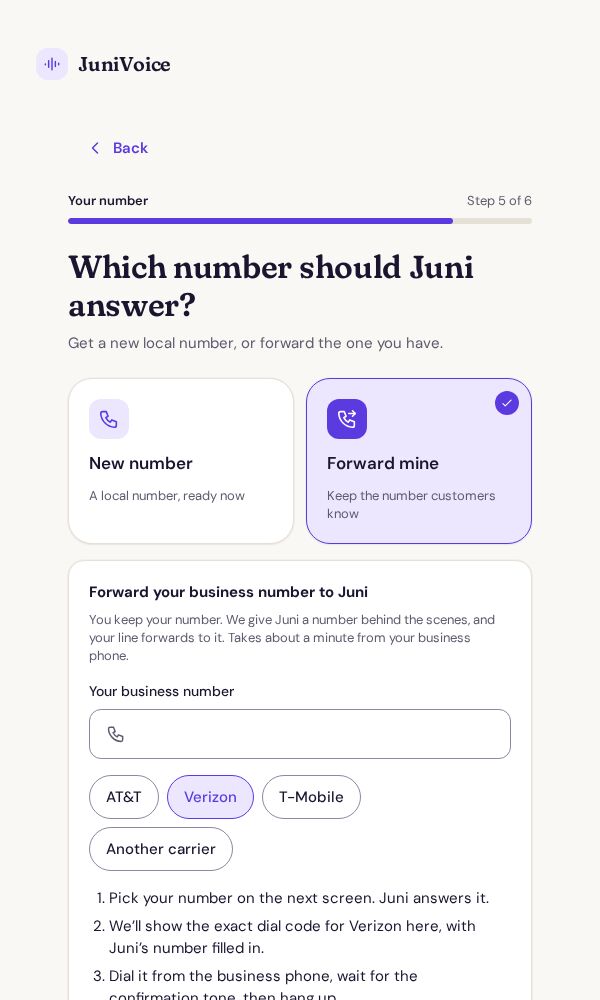
Forward your number to Juni or get a new one
Juni answers the calls that reach your JuniVoice number. Either forward the number your customers already call, or pick a new local number and give that out.
Where: Setup, step 5 "Which number should Juni answer?", or later in the app under Number.
Steps
- Open Number in the app (or reach step 5 during setup) and choose Forward mine to keep your number, or New number for a new one.
- New number: enter an area code, and optionally digits or a word, tap Search numbers, tap the number you like and Use this number. Numbers are free during your trial.
- Forwarding: enter your business number with area code and pick your carrier: AT&T, Verizon, T-Mobile or Another carrier.
- Pick the JuniVoice number your line will forward to. The app then shows the exact dial code for your carrier with Juni's number filled in.
- Dial that code from your business phone, wait for the confirmation tone, then hang up.
- Call your business number from another phone. Juni should answer, and the call appears in the app within seconds. You can also use Test my line under Number and phone.
Good to know
- Forwarding sends all calls to Juni. "Forward only when I don't answer" is coming soon; meanwhile Juni can ring your cell when a caller asks for you.
- Codes can differ by phone plan. If yours doesn't work, your carrier can switch forwarding on for you.
- We can't see your carrier's settings. If calls stop reaching Juni, dial the forwarding code again.
Checked against the JuniVoice app on October 30, 2026. Menu names may change slightly; tell us if something doesn't match.